One board. No internet. One button.
I built a small machine that watches a room and answers questions about it out loud. It has a camera, a microphone, and a speaker. It runs four AI models at the same time, one for seeing, one for hearing, one for thinking, and one for talking. And it does all of that with no internet at all. You can put it on a battery, set it on a shelf, and walk away. It will never reach the cloud, because it cannot. There is no Wi-Fi on it and I never wanted any.
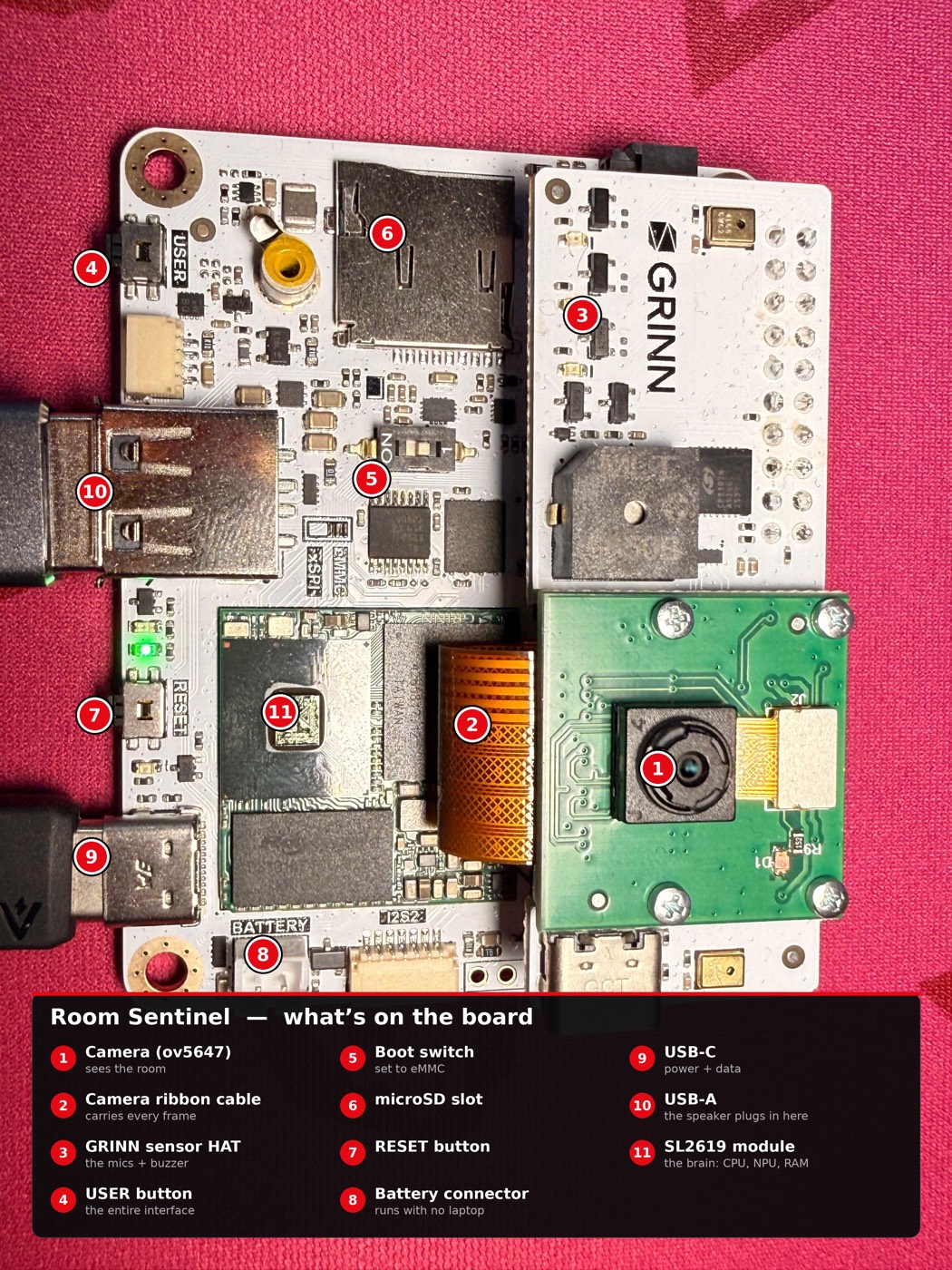
The whole thing runs on one board. I got it at Google I/O 2026. It is a Synaptics Coralboard, the Google I/O Edition, in the Astra SL2610 series, model SL2619. That is a mouthful, so I will just call it the board. The important part is how small it is. It has two CPU cores. It has about 1.87 gigabytes of usable memory. It has no swap, which means when memory runs out, there is no backup plan. It also has a little AI chip on it called the Coral NPU, which I will explain soon.
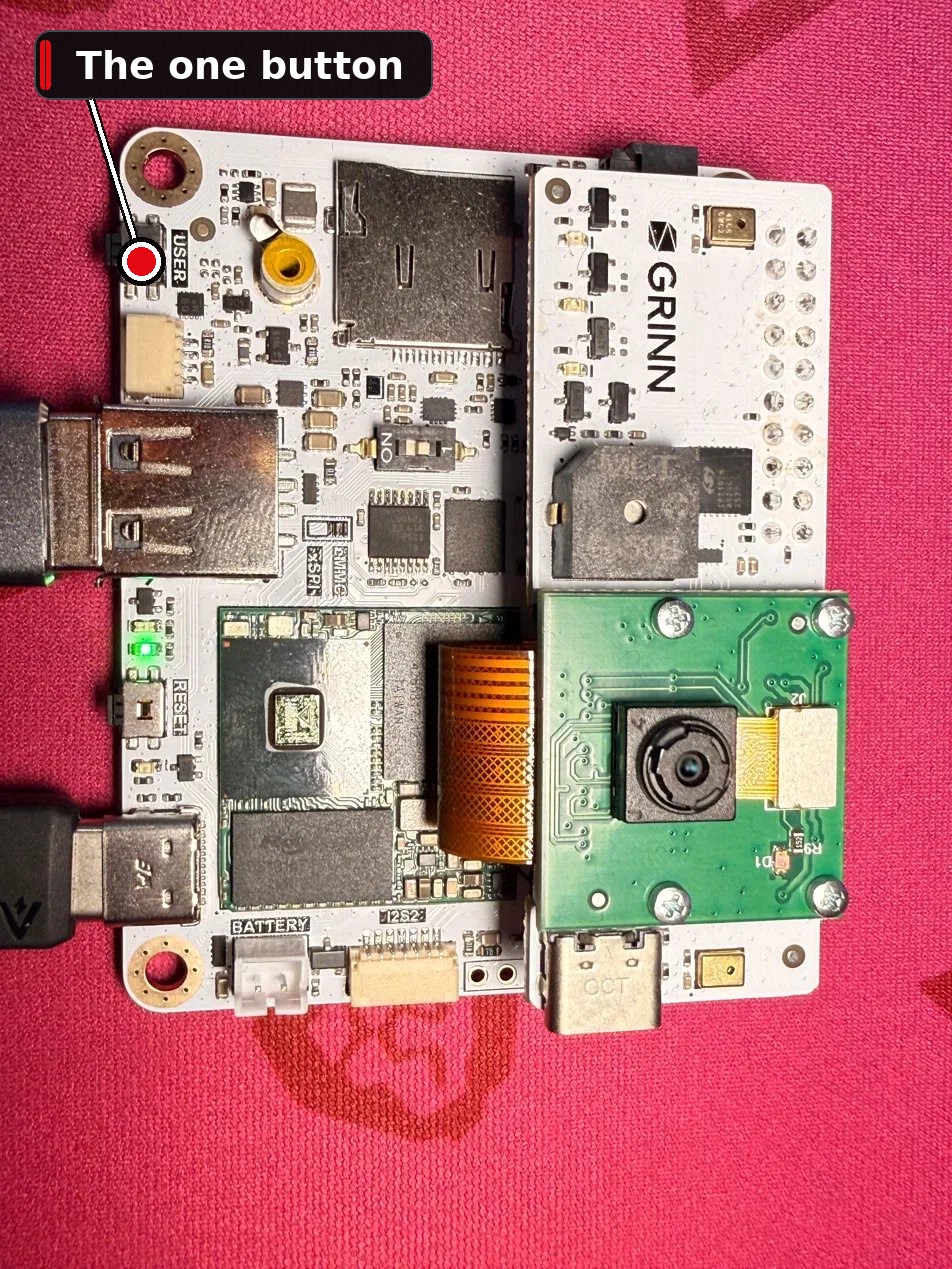
There is no screen. There is no keyboard. The entire interface is one button and one buzzer. You press the button to tell it what to do. It beeps back to tell you what it heard. That is the whole conversation. I called it Room Sentinel, because that is what it is. A quiet sentry for a room.
I want to be honest up front about why I am writing this. The happy path is short. You press a button, it works. The interesting part is everything that broke on the way there, and what each break taught me. So this is a teardown. We will follow the data through the machine, and then we will follow the failures. The failures are the good part.
What the box actually does
There are two jobs the box can do, and on this hardware it can only do one at a time. That rule turns out to be the heart of the whole story, so hold on to it.
The first job is the presence watcher. The camera turns on. Every frame goes to a person detector. When a person shows up, the box writes a line to a small local database that says someone appeared, with the time. When they leave, it writes that too. It chirps the buzzer once on arrival, so you know it saw you. That is it. It is a logbook for a room, kept by a camera that never sends a single image anywhere.
The second job is the voice assistant. You ask it one question out loud. It listens, turns your speech into text, thinks about an answer using the room's own history, and says the answer back through the speaker. So you can ask it "who has been in the room?" and it will tell you, based on what it actually saw, not on what it guessed.
That last part matters more than it sounds. Before the language model answers, I hand it the recent lines from the logbook as context. So the model is not free to make something up. It is reading the room's real history and putting it into a sentence. If the log says one arrival at 4:12 and nothing since, and you ask who has been around, it says something like "one person arrived a few minutes ago and is still here." If the log is empty, it says the room has been empty. The model is the part that turns facts into a sentence. The facts come from the camera. I keep those two jobs separate on purpose, because a model that is allowed to invent visitors is worse than useless for this.
Here is the full chain of models, end to end. The camera feeds a person detector called YOLOv8n, which runs on the Coral NPU. The microphone feeds a speech to text model called sherpa-onnx Zipformer. The text goes into a small language model called Gemma 3 270M. The answer goes into a text to speech model called Piper, which speaks it out loud. Four models. Two cores. One board. No internet.
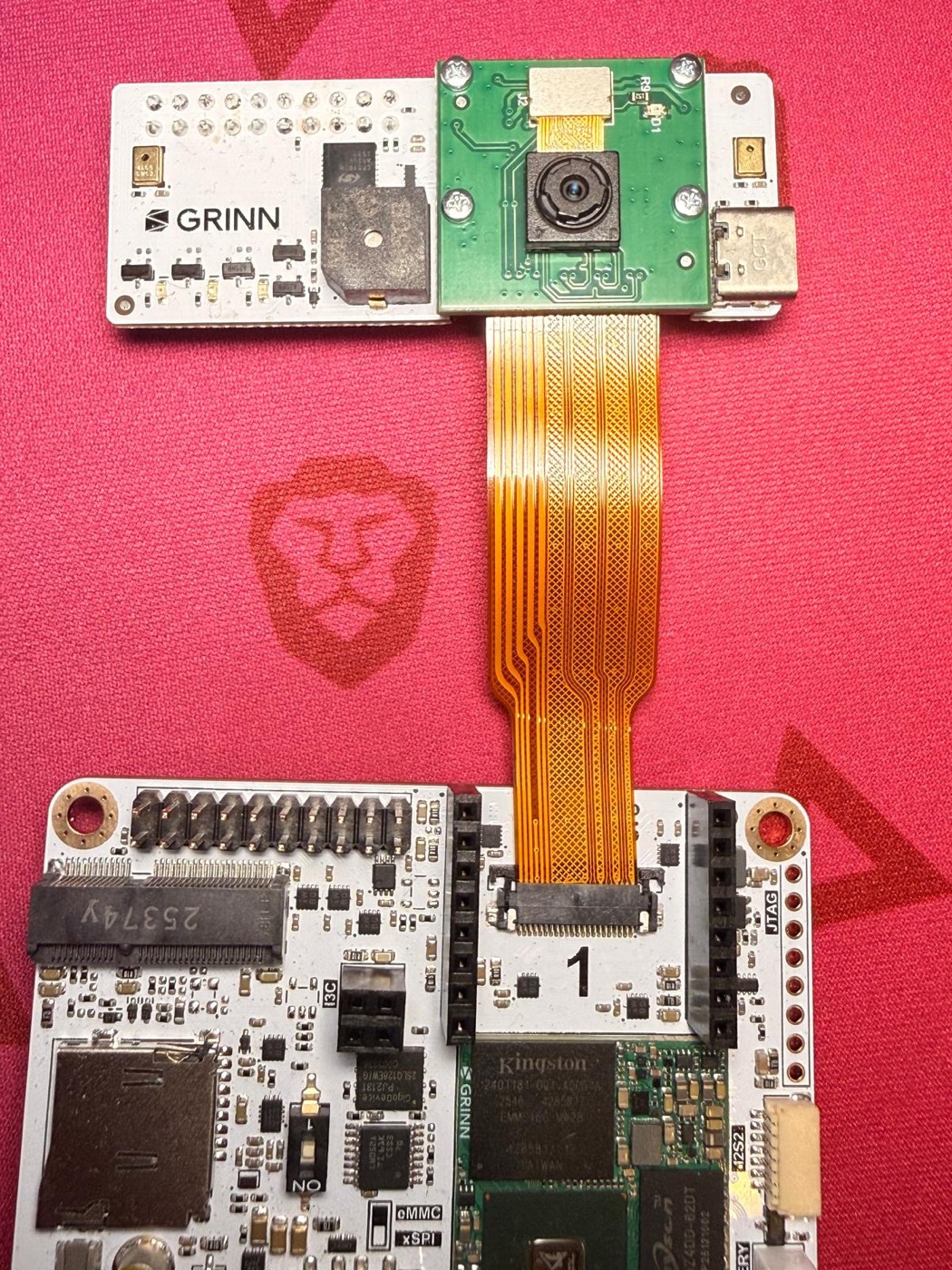
I am not going to walk you through wiring the board or mounting the camera ribbon. Google already wrote that guide and it is good. This post is about what I built on top of that, not how to screw the camera in.
Start with Google's official get-started guide for the Coralboard. It is the right first step: it walks through plugging in the camera ribbon, mounting the sensor HAT, setting the boot switch to eMMC, and the first login over USB with no password. Get the board to its AI demos using that guide, then everything in this post is the software layer I added on top.
Following one frame through the machine
Let me slow down and follow a single camera frame, from the lens to the logbook, because it is the clearest way to explain the NPU.
A frame comes off the camera. It is just a grid of numbers, the brightness and color of every pixel. To find a person in that grid, you run a neural network over it. A neural network is a big pile of multiplications. Doing all of those multiplications on a normal CPU core is slow, and I only have two cores, and I need them for everything else. So the board has a separate little chip whose only job is to run neural networks fast. That chip is the Coral NPU. NPU stands for neural processing unit. Think of it as a tiny, very fast calculator that the two main cores can hand work to and forget about.
The model I run on it is YOLOv8n. The "n" means nano, the smallest version. It looks at the frame and draws boxes around things it recognizes, and tells me how sure it is. I only care about one label, person. To reach the NPU, the model does not run as plain Python. It is compiled first by something called the Synaptics Torq runtime, which translates the model into instructions the NPU understands. I did not have to write any of that. I just had to point my code at it.
This runs at about fifteen frames a second. That number is a choice, not a limit. I could push the camera faster, but every extra frame is more work for the NPU and more heat and more battery, and fifteen is already faster than a person walks. So I leave headroom on purpose. The cores stay mostly idle during watching, which is the whole reason the box can sit on a battery for a long time instead of cooking itself.
But there is a problem. A detector is never perfectly steady. For a single frame it might lose you behind a chair, or see a person in a coat on a rack. If I wrote "someone appeared" on every single frame that said person, the logbook would be a mess of flicker.
So I added a simple human idea. I wait until five frames in a row agree before I believe anything. Five frames that all say person, and only then do I write "someone appeared." Five frames that all say empty, and only then do I write "they left." This is called debouncing, and it is the same trick a doorbell uses so one press does not register as ten. It costs me a third of a second of lag and buys me a logbook I can trust. Scroll slowly and watch the five frames line up.
Quantization. The models I use are shrunk. Gemma is stored in a format called Q8_0, and the speech model in something called int8. You do not need the math. Normally these models store their numbers in a big, precise format. Quantizing means rounding those numbers down to a smaller, rougher format. The model gets much smaller and runs much faster, and it loses a tiny bit of accuracy that you mostly cannot feel. On a board with under two gigabytes of memory, that trade is the only reason any of this fits.
I also run Gemma at what is called temperature zero. Temperature is how much randomness the model is allowed when it picks words. Zero means none. It always takes the most likely next word. For a chatbot that makes it a little boring. For a box that is supposed to report what actually happened in a room, boring is exactly what I want. I do not want it inventing a visitor who was never there.
The whole interface is one button
Now the fun part. There is no screen, so I had to make a language out of beeps.
The button cycles through three states. Off, watching, and asking. From off, one tap starts the camera watcher, and you hear one beep. Tap again and it stops the camera and gets ready to take a question, and you hear two beeps. Hold the button for about two seconds at any time and everything turns off, with one long beep. So the grammar is simple. One beep means I am watching. Two beeps mean I am listening for a question. One long beep means I went to sleep.
Press the button below. It is the real beep grammar, built in your browser with no sound files. Every beep also draws its shape and lights the state ring, so it works just as well with the sound off.
The voice flow has one more cue inside it. After the two beeps, the box needs about twenty to thirty seconds to load the speech and language models into memory. You should not talk during that time, because it is not listening yet. When it is finally ready, it gives you one short beep that means speak now. That single beep is the most important sound the box makes. It is the green light. You ask your question right after it, and a few seconds later the box answers out loud and goes back to sleep.
There is a fourth cue, and it is the one I almost forgot, and it became a small lesson. We will get to it. First I want to tell you about the night the board died.
The night the board vanished
My first version was greedy. I let the camera watcher keep running while the voice assistant loaded. It felt efficient. Why stop watching the room just to answer a question? Let them share.
They did not share.
The moment the voice models started loading on top of the running camera, the whole board locked up. Not slowed down. Locked. It stopped responding to my laptop completely. The debug connection, which is normally rock solid, dropped the board like it had been unplugged. I could not get a prompt. I could not kill anything. The only thing that brought it back was reaching over and physically cutting the power and turning it on again.
The first thing I checked was memory, because that is the usual suspect. It was not memory. I had about 1.1 gigabytes free the entire time. The box was not out of memory. It was out of something else.
It was out of CPU. I have two cores and no swap. The camera was already keeping both cores busy with its steady fifteen frames a second of detection. Then I asked those same two cores to also load and warm up two more heavy models. There was no third core to absorb it. The scheduler, the part of the system that hands slices of time to each task, had nothing left to hand out. Everything got starved at once, including the little housekeeping tasks that keep the board talking to my laptop. So the board did not crash in a clean, loud way. It just quietly stopped being able to do anything, which from the outside looks exactly like a dead board.
1.1 GB free and still dead.
That is the trap. With no swap there is no cushion, so the failure is not gentle. You do not get a slow, laggy warning. You get a wall. One second it is fine and the next it is gone, with over a gigabyte of memory still free, which is why it fools you. It looks healthy right up until it is a brick.
One heavy thing at a time
The fix is almost embarrassing in how simple it is, and that is usually the sign of a good fix.
I stopped letting the two modes overlap. Now the box does one heavy thing at a time, and only one. When you tap from watching into asking, the box does not start the voice models next to the camera. It stops the camera first. Fully. It does not just send a polite request and move on. It sends the camera process a signal to shut down, and then it actually waits for that process to end. It does not assume. It checks. Only once the camera is confirmed gone does it start the voice models. Stop, prove dead, then start. The word "prove" is the important one. The old version stopped the camera and started the voice models in the same breath, trusting the stop to have finished. It had not. Now I wait for proof. The overlap that killed the board is impossible, not by luck, but by construction. There is no moment in the code where both can be running.
Both on two cores at once. Board gone.
Stop the camera, prove it is dead, then start voice. No overlap is possible.
The part that does this traffic control is a small program I call the supervisor. It sits and listens to the button, and it owns the rule. It is written in plain Python with nothing but the standard library. No frameworks, no clever dependencies. That was a deliberate choice. This is the one piece that must never fall over, because it is the thing that prevents the meltdown. The fewer moving parts it has, the fewer ways it can break. Boring on purpose, again.
There is a nice side effect. Because only one mode ever runs, both modes get the whole board to themselves while they run. The camera gets two full cores. The voice models get two full cores. By refusing to share, each job actually goes faster. The constraint made it better.
Do one heavy thing at a time. On small hardware, sharing is not generosity. It is the fastest way to lose everything at once.
Do one heavy thing at a time.
Lab audio is not mic audio
The voice side had its own trap, and it is a good one, because it hid inside the official example code.
The board ships with a set of reference demos. One of them is a speech to text demo, and it uses a model called Moonshine. So my first move was the obvious one. Use what the vendor ships. I wired Moonshine in and tested it on a few clean audio clips, and it was perfect. Crisp transcriptions, every word. Great. Ship it.
Then I pointed it at the actual microphone on the board, in an actual room, and it returned nothing. Empty strings. Every time. The same model that nailed clean clips could not produce a single word from the real mic.
The clips were the problem, or rather, my faith in them was. A clean recording from my laptop is not the same signal as a live microphone on a specific piece of hardware. The clips were lab audio. The mic was hardware audio. They look the same on a chart and they are not the same thing at all. So the demo was not lying when it said it worked. It worked on the input the demo was tested with. It had just never met this mic.
Lab audio is not hardware audio.
I swapped Moonshine out for a different speech to text model, sherpa-onnx Zipformer, and started testing against the real microphone from the very first second, not against tidy clips. That is the real lesson here, and it is bigger than one model. The reference stack had a gap in it, a place where it worked in theory and failed on real hardware, and the only way to find that gap was to stop trusting the clean case and go straight at the messy one. Test the thing you are actually going to use, on the hardware you are actually going to use, on day one.
The buzzer that screams when you ignore it
The buzzer almost broke me, and it is the smallest part of the whole machine.
It is a tiny piezo buzzer on the sensor HAT, wired to a single pin on the board. I expected the simplest possible thing. Send the pin a high signal to make sound, send it low for silence. Normal.
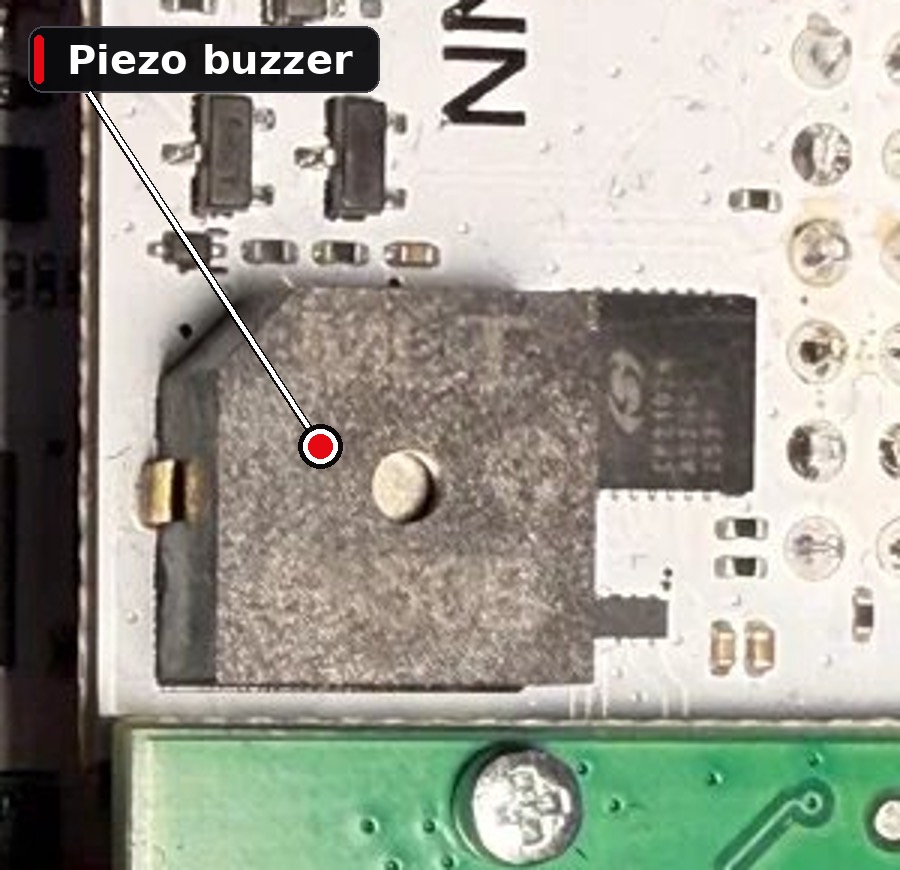
It is backwards. The buzzer is what is called active low. A low signal makes it scream, and a high signal makes it quiet. That alone is just a thing to remember. The real trap is what happens when you are not driving the pin at all.
An electrical pin that nobody is actively holding does not sit politely at zero. It drifts. And on this board, an undriven buzzer pin drifts low. Low means sound. So the default state of the buzzer, the state it falls into the instant your program is not paying attention to it, is on. A constant, full volume tone. If your program starts up, beeps once, and exits cleanly like a normal program should, the pin goes undriven, drifts low, and the room fills with a flat scream that does not stop.
So you cannot just beep and walk away. You have to hold the pin high forever. The fix is to leave a tiny background command running whose entire job is to keep the pin pinned high, silent, for as long as the box is alive. It is the opposite of how I think about sound. Silence is not the absence of work here. Silence is the work. You have to actively hold the quiet. Curious what the runaway sounds like? Press the float-trap chip back up in the console.
# active-low: HIGH = silent. An undriven line drifts LOW and blares.
# so a detached process holds the pin HIGH for as long as the box lives.
gpioset --mode=signal gpiochip0 6=1 &The small stuff that mattered
A few smaller things never made it into a war story but absolutely earned their place, so here is the short list.
amixer command, every time.arecord, ask for a fixed number of seconds, and wait for the file. Less elegant, never breaks.And the whole thing starts itself. You give it power and it comes up watching for the button. Which brings me back to the cue I almost forgot. The missing beep.
Everything worked. The box booted, the service started, the supervisor sat there listening, the buzzer was correctly silent. There was no bug anywhere. And yet every time I plugged it into the battery, I stood there unsure if it was alive, because a screenless box that makes no sound looks exactly like a screenless box that is dead. The silence I had worked so hard to hold was now the problem. So I added one more cue. When the box has finished booting and is really listening, it plays three quick beeps. A little "I am awake." It fixed nothing technical and it made the whole thing feel finished.
On a screenless box, silence is not neutral.
Silence reads as broken. You have to spend a sound to say "I am fine."
What I would tell you before you build one
If you take anything from this, take these.
Do one heavy thing at a time. Small hardware does not punish you gently. It does not get slow and warn you. It hits a wall and disappears, often with memory to spare, because the thing it ran out of was not memory. Respect the scarcity you actually have, not the one you are used to.
Test on the real hardware from the first minute. The clean case will lie to you. The vendor demo will pass and the real mic will return nothing, and you will only find the gap if you go at the messy, real input early instead of saving it for last.
Mind the quiet. On a box with no screen, the absence of feedback is feedback, and it says the wrong thing. A buzzer that drifts into a scream, and a silence that reads as death, are the same lesson from two directions. You have to actively design every state, including the quiet ones.
Keep the one piece that must not fail as simple as you possibly can. The supervisor that holds the whole appliance together is the most boring code in the project, plain Python and nothing else, and that is exactly why I trust it.
That is the box. It watches the room. It never phones home.